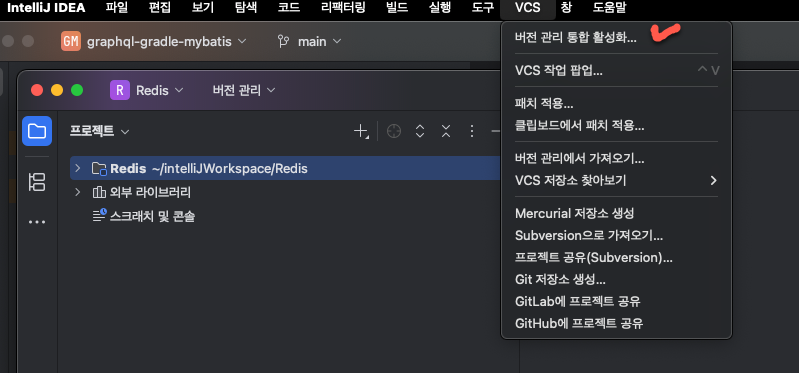
1. 메뉴에서 VCS -> 버전 관리 통합 활성화 선택
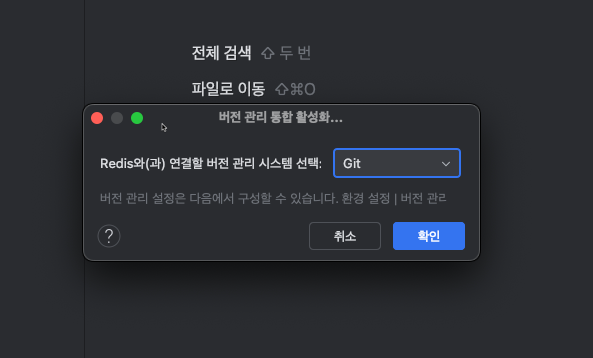
2. Git 선택
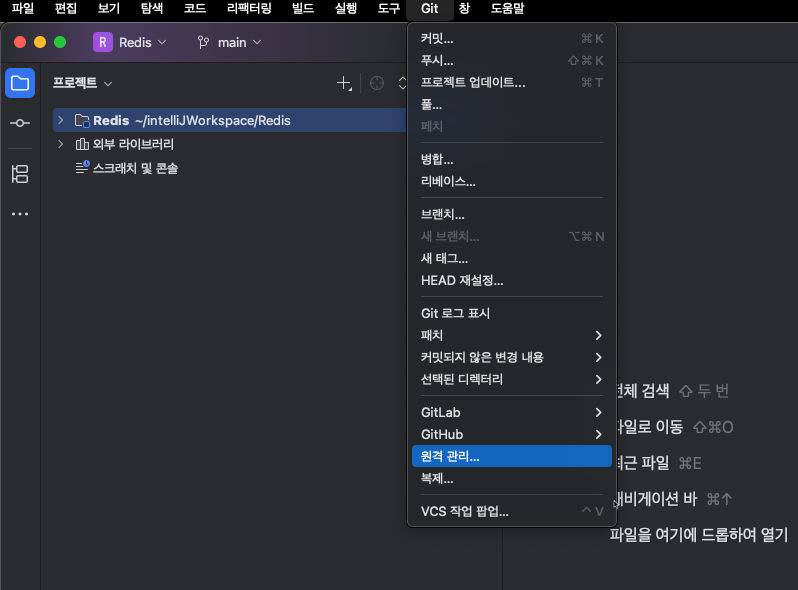
3. VCS -> Git 으로 변경된 메뉴를 클릭하고 원격 관리... 를 선택한다.
4. + 를 클릭하여 사설 저장소를 등록한다.
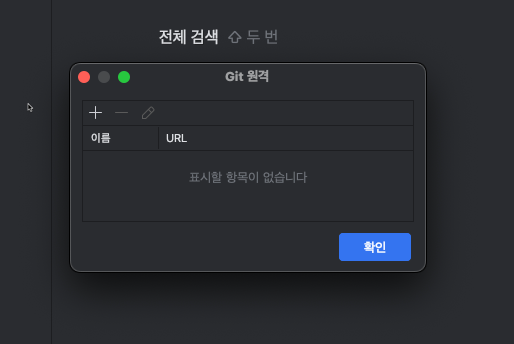
5. 저장소 연결
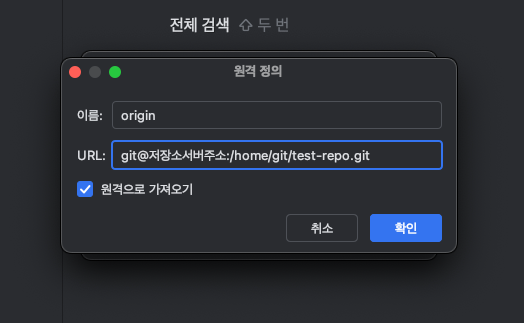
6. 비밀번호 입력
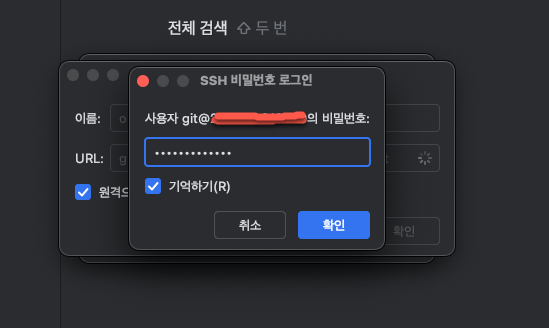
7. 추가중
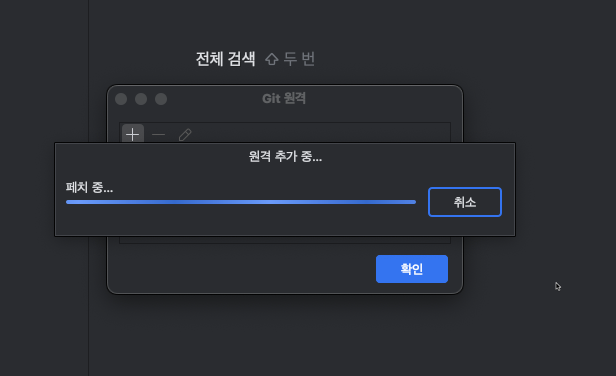
8. 추가완료
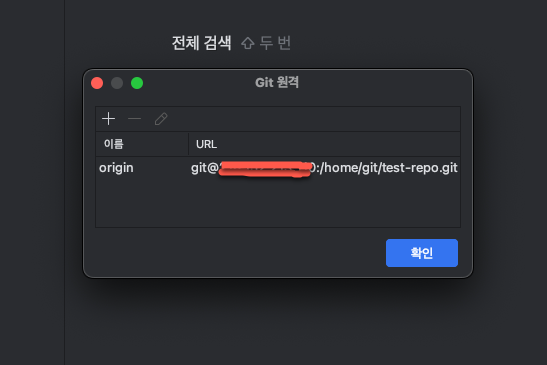
9. 프로젝트 폴더에 터미널로 이동
ellord@Chanui-MacBookPro Redis % git init
ellord@Chanui-MacBookPro Redis % ls -la
total 8
drwxr-xr-x   6 ellord  staff  192 Jan 25 10:09 .
drwxr-xr-x   6 ellord  staff  192 Jan 25 09:37 ..
drwxr-xr-x  13 ellord  staff  416 Jan 25 10:22 .git
drwxr-xr-x   8 ellord  staff  256 Jan 25 09:59 .idea
-rw-r--r--   1 ellord  staff    4 Jan 25 10:08 test.html
-rw-r--r--   1 ellord  staff    0 Jan 25 10:09 test2.html
git init 후
.git 폴더가 생성됨
git add *
git config user.email "test@test.com"
git config user.name "git"
git commit -m "커밋테스트"
서버로 push 하기전까지 commit
10. git 서버 접속설정 : rsa_key 생성
ellord@Chanui-MacBookPro Redis % ssh-keygen -t rsa
Generating public/private rsa key pair.
Enter file in which to save the key (/Users/ellord/.ssh/id_rsa):
...
중략(비밀번호 입력)
...
사용자 홈 디렉토리에 .ssh 폴더가 생기고 id_rsa, id_rsa.pub 파일이 생김
ellord@Chanui-MacBookPro .ssh % ls -la
total 32
drwx------   6 ellord  staff   192 Jan 25 10:41 .
drwxr-x---+ 54 ellord  staff  1728 Jan 25 10:41 ..
-rw-------   1 ellord  staff  2675 Jan 25 10:17 id_rsa
-rw-r--r--   1 ellord  staff   584 Jan 25 10:17 id_rsa.pub
-rw-------   1 ellord  staff  1234 Jan 25 09:19 known_hosts
-rw-------   1 ellord  staff  1057 Jan 25 09:19 known_hosts.old
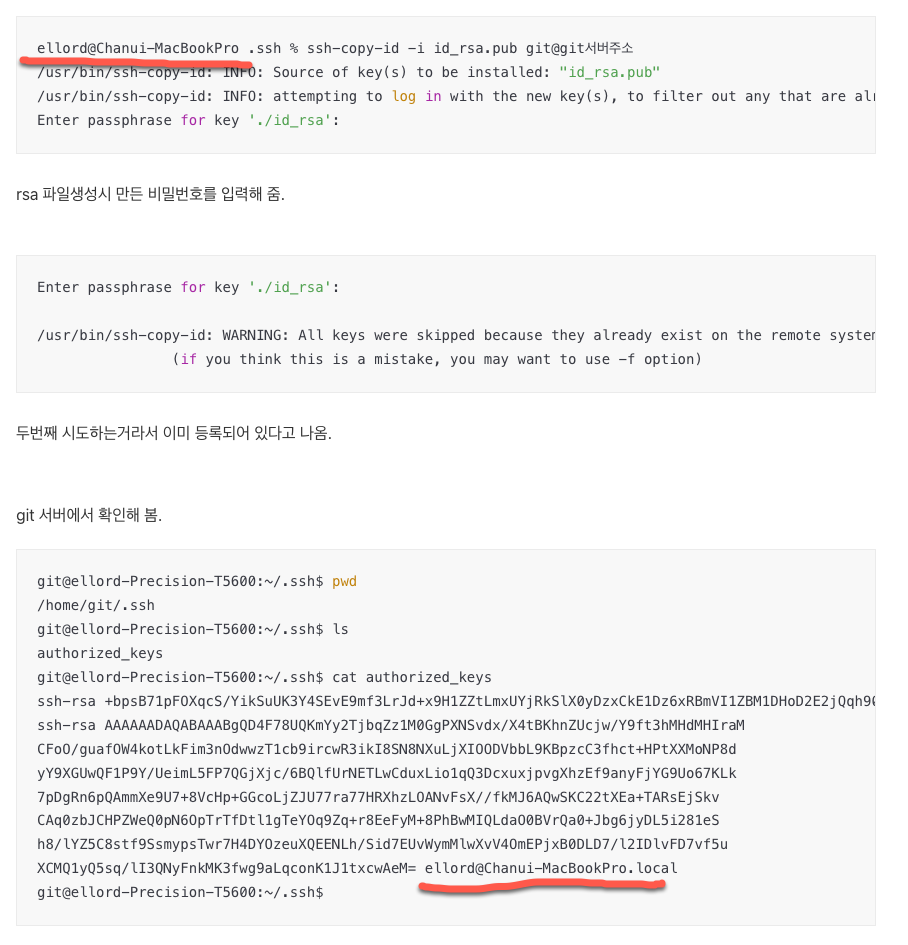
id_rsa.pub 파일을 git 서버로 전송함.
ellord@Chanui-MacBookPro .ssh % ssh-copy-id -i id_rsa.pub git@git서버주소
/usr/bin/ssh-copy-id: INFO: Source of key(s) to be installed: "id_rsa.pub"
/usr/bin/ssh-copy-id: INFO: attempting to log in with the new key(s), to filter out any that are already installed
Enter passphrase for key './id_rsa':
rsa 파일생성시 만든 비밀번호를 입력해 줌.
Enter passphrase for key './id_rsa':

/usr/bin/ssh-copy-id: WARNING: All keys were skipped because they already exist on the remote system.
                (if you think this is a mistake, you may want to use -f option)
두번째 시도하는거라서 이미 등록되어 있다고 나옴.
git 서버에서 확인해 봄.
git@ellord-Precision-T5600:~/.ssh$ pwd
/home/git/.ssh
git@ellord-Precision-T5600:~/.ssh$ ls
authorized_keys
git@ellord-Precision-T5600:~/.ssh$ cat authorized_keys
ssh-rsa +bpsB71pFOXqcS/YikSuUK3Y4SEvE9mf3LrJd+x9H1ZZtLmxUYjRkSlX0yDzxCkE1Dz6xRBmVI1ZBM1DHoD2E2jQqh90N6QI5oZsV40uwRfYGmnGozuwPBiSKSfNDPJqaTriMH2mvgtNGo17GMHdtkJn0mslF5cLlEpES5HlIq6WecHG1xyJ67IgG/vkXbKIFvLl4/DCumpU+xp8GBMJsAYyI5Y70Ils3G01oSBBUE0TznOs4mSRYO2j6yl26yopIrG+yl+tw2qB5kvN3AlD48KmkhnRM58adxdmGQdNKieKYS/tvJWCjLQACtIaO1K5bDQ1Hfmu9m8m2/VrvGxltDleXG+a0WFX1HbZAxXHtls6eTz1cf4f6B2oBerm53WBhQE3p/3BmDThg927XQMudvjNT2k1Dz5Us= ellord@ellord-Precision-T5600
ssh-rsa AAAAAADAQABAAABgQD4F78UQKmYy2TjbqZz1M0GgPXNSvdx/X4tBKhnZUcjw/Y9ft3hMHdMHIraM
CFoO/guafOW4kotLkFim3nOdwwzT1cb9ircwR3ikI8SN8NXuLjXIOODVbbL9KBpzcC3fhct+HPtXXMoNP8d
yY9XGUwQF1P9Y/UeimL5FP7QGjXjc/6BQlfUrNETLwCduxLio1qQ3DcxuxjpvgXhzEf9anyFjYG9Uo67KLk
7pDgRn6pQAmmXe9U7+8VcHp+GGcoLjZJU77ra77HRXhzLOANvFsX//fkMJ6AQwSKC22tXEa+TARsEjSkv
CAq0zbJCHPZWeQ0pN6OpTrTfDtl1gTeYOq9Zq+r8EeFyM+8PhBwMIQLdaO0BVrQa0+Jbg6jyDL5i281eS
h8/lYZ5C8stf9SsmypsTwr7H4DYOzeuXQEENLh/Sid7EUvWymMlwXvV4OmEPjxB0DLD7/l2IDlvFD7vf5u
XCMQ1yQ5sq/lI3QNyFnkMK3fwg9aLqconK1J1txcwAeM= ellord@Chanui-MacBookPro.local
git@ellord-Precision-T5600:~/.ssh$
정상적으로 등록됨
ssh-rsa 문자열의 마지막 부분 ellord@Chanui-MacBookPro.local 이 rsa를 생성했던 호스트명으로 확인됨.
11. git 서버로 푸시해봄.
ellord@Chanui-MacBookPro Redis % git status
On branch main
Your branch is up to date with 'origin/main'.

Untracked files:
  (use "git add <file>..." to include in what will be committed)
        .idea/

nothing added to commit but untracked files present (use "git add" to track)
git push
ellord@Chanui-MacBookPro Redis % git push --set-upstream origin main
Enter passphrase for key '/Users/ellord/.ssh/id_rsa':
branch 'main' set up to track 'origin/main'.
Everything up-to-date
새로운 파일을 추가하고 시도해 봄
ellord@Chanui-MacBookPro Redis % touch test3.html
ellord@Chanui-MacBookPro Redis % ls
test.html       test2.html      test3.html
ellord@Chanui-MacBookPro Redis % git add *
ellord@Chanui-MacBookPro Redis % git status
On branch main
Your branch is up to date with 'origin/main'.

Changes to be committed:
  (use "git restore --staged <file>..." to unstage)
        new file:   test3.html

Untracked files:
  (use "git add <file>..." to include in what will be committed)
        .idea/

ellord@Chanui-MacBookPro Redis % git commit -m "TEST3"
[main 03ba7e0] TEST3
 1 file changed, 0 insertions(+), 0 deletions(-)
 create mode 100644 test3.html

ellord@Chanui-MacBookPro Redis % git status
On branch main
Your branch is ahead of 'origin/main' by 1 commit.
  (use "git push" to publish your local commits)

Untracked files:
  (use "git add <file>..." to include in what will be committed)
        .idea/

nothing added to commit but untracked files present (use "git add" to track)

ellord@Chanui-MacBookPro Redis % git push
Enter passphrase for key '/Users/ellord/.ssh/id_rsa':
Enumerating objects: 3, done.
Counting objects: 100% (3/3), done.
Delta compression using up to 8 threads
Compressing objects: 100% (2/2), done.
Writing objects: 100% (2/2), 257 bytes | 257.00 KiB/s, done.
Total 2 (delta 0), reused 0 (delta 0), pack-reused 0
To 218.152.213.110:/home/git/test-repo.git
   14c3dfe..03ba7e0  main -> main
ellord@Chanui-MacBookPro Redis %

엘로드넷